| Reminder | Timing | Default |
|---|---|---|
| Appointment reminder | About 24 hours before the appointment | On |
| Appointment reminder | About 1 hour before the appointment | On |
| Appointment reminder | About 30 minutes before the appointment | Off |
| Patient portal registration | Every 3 days; at most 3 emails including the invitation | On |
| Book the next appointment | 5 days after the last session | On |
| Second booking reminder | 10 days after the last session | On |
Choose reminders in practice settings
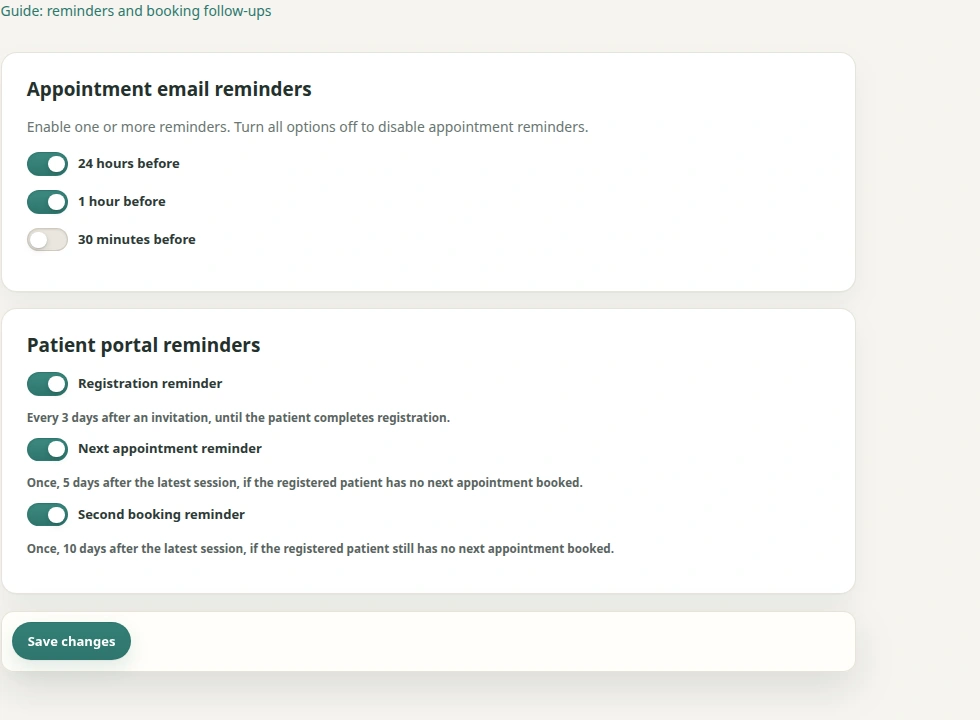
Open Settings → Reminders. The 24-hour, 1-hour and 30-minute appointment reminders have separate switches. Choose the timings you want and save the settings.
You can also switch portal registration reminders and the first and second booking reminders on or off independently. The defaults shown here describe the initial configuration; your saved practice settings determine what is sent.
Remind patients about an existing appointment
Appointment reminders are sent for confirmed or booked appointments. With both 24-hour and 1-hour reminders enabled, a patient can receive two reminder emails for the same appointment. The email design and appointment information stay the same.
A cancelled appointment should receive no further reminders. After rescheduling, reminders follow the new appointment. An email already delivered may still show earlier details, so check the current appointment overview when in doubt.
Follow up an unfinished portal registration
Theravo sends at most three portal registration emails in total: the invitation and up to two reminders three days apart. Reminders do not start without a sent invitation.
Reminders stop after the third email, or earlier when registration is completed. Resending an invitation does not reset the count. The practice can also turn reminders off under Settings → Reminders.
Invite a patient to book after their session
The first booking reminder is due after five days and the second after ten days. Both switches are enabled by default and can be changed independently. They apply to registered patients who have no later active appointment following their last session.
A pending booking or payment request can already count as a later active appointment. Cancelled or expired bookings do not suppress the reminder. If processing happens late, the ten-day reminder can replace the overdue five-day reminder.
The email button opens the booking page for existing patients. Known details are prefilled and the flow starts at date selection. Initial-consultation appointment types are excluded. Eligible session packages remain available in the booking flow; buying a package alone does not reserve an appointment.
If an email is missing or its link no longer works
Check current appointments and the saved reminder switches first. Email delivery and the regular sending process can affect when a message arrives. A missing reminder does not mean that an appointment has been cancelled.
Booking links are time limited. If a link no longer works, use the practice’s known booking access or contact the practice. Reminder settings are currently managed by the practice.
Frequently asked questions
Will a booking reminder still be sent after a patient books?
A later active appointment suppresses the booking reminder. Pending booking requests can also count.
Can I turn off the second booking reminder?
Yes. The practice can change the ten-day reminder switch independently of the first reminder.
Does a reminder change my appointment booking?
A reminder email does not create or confirm a new appointment. The current booking status remains authoritative.